When different parts of your question use different question modes — for example,
numerical and multiple-choice — you can create a multi-mode question to specify a
list of the
modes used in your question, and indicate where each new mode begins with
<SECTION> tags in both Question and
Answer.
-
Beside Mode, click Multi-Mode Options.
-
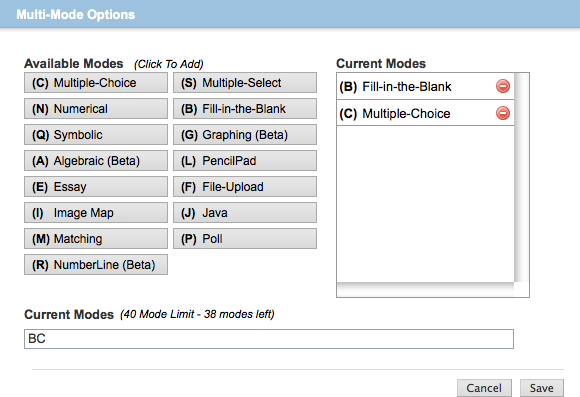
In the Multi-Mode Options window, click the question modes that you want to use in
your
question in the order in which they will be used, or type the mode abbreviations in
the
Current Modes box at the bottom.
Each mode that you add is shown in the Current Modes list on the right. You can click
 to delete a mode from the list, or drag a mode to rearrange the list. Important When your question has consecutive multiple-choice or multiple-select question parts, you must specify the mode for each question part, for example, CC to create a question with two multiple choice parts.
For other question modes, you can choose to specify the mode either for each question part or only when the question mode changes. For example, to create a question with three numerical question parts followed by a multiple-choice part, you could select either NNNC or simply NC.
Tip The Poll mode lets you create polling questions with other modes. See Create Polling Questions.When the list of modes is correct, click Save.
Example Multi-Mode Question (Fill-in-the-Blank and Multiple-Choice)
The following table summarizes an actual question.
|
QID |
|
|---|---|
|
Name |
|
|
Mode |
|
|
Question |
|
|
Answer |
|
|
Display |

|
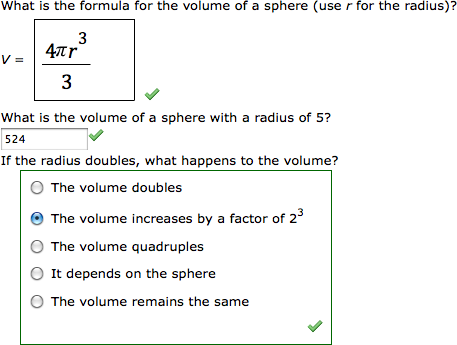
Example Multi-Mode Question (Algebraic, Numerical, and Multiple- Choice)
The following table summarizes an actual question.
|
QID |
|
|---|---|
|
Name |
|
|
Mode |
|
|
Question |
|
|
Answer |
|
|
Display |
|